Mobile Screen Pattern Lock: A Complete Guide to Security, Usage, and Best Practices
In the modern digital age, smartphones have become an essential part of our daily lives. From personal photos and messages to banking apps and official documents, mobile devices store a vast amount of sensitive information. To protect this data from unauthorized access, mobile operating systems provide several screen lock options such as PINs, passwords, fingerprints, face recognition, and pattern locks. Among these, the mobile screen pattern lock is one of the most popular and widely used security methods, especially on Android devices. This article explores what a pattern lock is, how it works, its advantages and disadvantages, security concerns, and best practices for using it effectively.
What Is a Mobile Screen Pattern Lock?
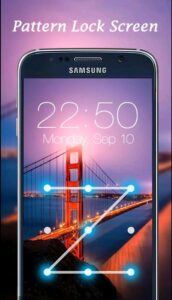
A mobile screen pattern lock is a graphical security mechanism that requires users to draw a specific pattern on a grid of dots (usually 3×3) to unlock their device. Instead of typing numbers or letters, users simply connect dots in a particular sequence. If the drawn pattern matches the saved one, the phone unlocks.
Pattern locks were introduced to provide a balance between security and convenience. They are easier to remember than long passwords and faster to use than typing a PIN, making them especially popular among users who unlock their phones frequently throughout the day.
How Pattern Lock Works
The pattern lock system is based on a predefined grid, most commonly consisting of nine dots arranged in a square. When setting up a pattern lock, the user selects a sequence by drawing a line that connects multiple dots. The phone records this sequence and stores it in an encrypted form.
When the user later attempts to unlock the phone, the system compares the entered pattern with the stored one. If they match, access is granted. If the pattern is incorrect, the phone remains locked. After multiple failed attempts, the device may impose a waiting period, request backup authentication (such as a PIN or Google account), or temporarily disable access for security reasons.
Popularity of Pattern Locks
Pattern locks gained popularity due to their simplicity and visual nature. Many users find it easier to remember shapes or paths rather than numeric combinations. This makes pattern locks especially attractive for children, elderly users, or those who prefer quick unlocking without much effort.
In regions where Android devices dominate the smartphone market, pattern locks are often the default choice during initial device setup. Even today, despite the rise of biometric security, pattern locks remain widely used as a primary or secondary authentication method.
Best Practices for Using Pattern Lock Securely
To maximize the security of your mobile screen pattern lock, consider the following tips:
- Use a Complex Pattern
Connect at least 6–7 dots and avoid simple shapes. The more dots you use, the harder it is to guess. - Avoid Common Patterns
Do not use obvious shapes, letters, or numbers. Random-looking patterns are more secure. - Change the Pattern Regularly
Updating your pattern periodically reduces the risk of unauthorized access. - Disable Pattern Visibility
Turn off the option that shows the pattern lines while unlocking to prevent shoulder surfing. - Enable Auto-Lock Quickly
Set your phone to lock automatically after a short period of inactivity. - Use a Backup Lock Method
Always set a secure PIN or password as a backup in case you forget the pattern. - Combine with Biometrics
Use fingerprint or face unlock along with the pattern for added security.
Download
Conclusion
The mobile screen pattern lock remains a popular and practical security feature, especially for users who value speed and simplicity. While it may not be the most secure option available today, it offers a good balance between usability and protection when used correctly. By choosing a strong pattern, following best practices, and combining it with additional security features, users can significantly enhance the safety of their mobile devices.